



1. What is Product Registration?
This is a preparatory step for sending products registered on the sales site through the Smart Shipping service operated by SmartShip.
2. How do I register a product?

There are two ways to register a product on SmartShip.
1.
Excel Registration (Bulk Registration)
2.
Individual registration (Create New Order)
1. How to Register Excel (Bulk Registration)

Path : SmartShip > Inventory > Product Management
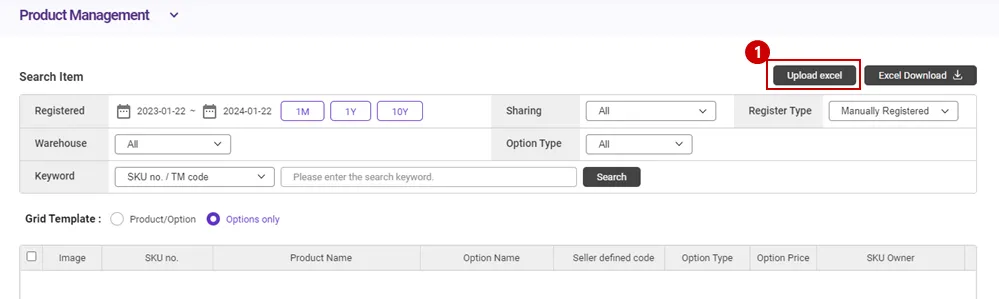
1.
Please click the [Upload Excel] button.

2.
Please click the [Download CSV] or [Download Excel] button.
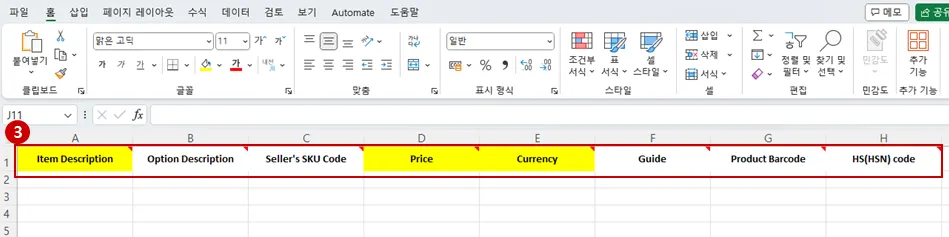
3.
After downloading the Excel format, fill in the “yellow fields” as required. (product name, product URL information)
* Item URL is mandantory only for KR outbound international delivery.

4.
Please click the [Select File] button to register the Excel file and, click the [Excel Upload] button to complete product registration.
2. How to Register Individually
Path : SmartShip> Inventory > Product Management
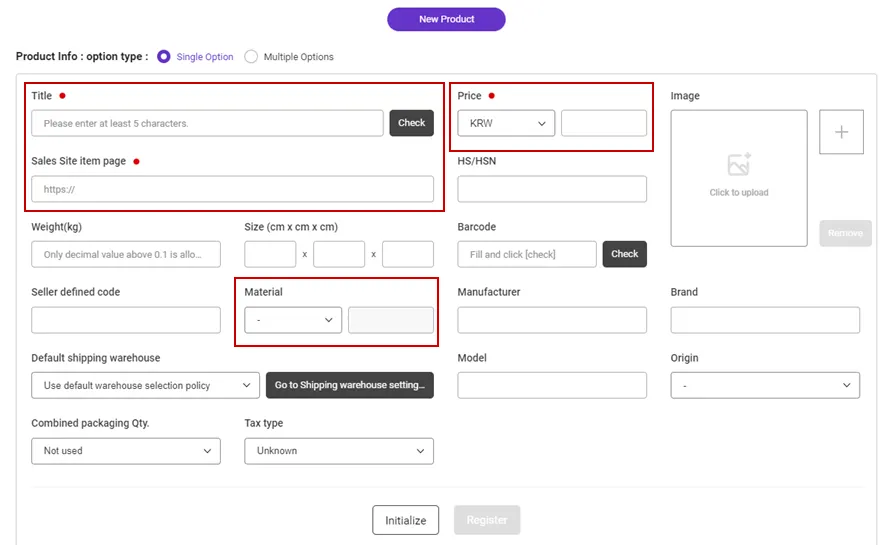
•
Please enter “Title”, “Price” and “Sales Site item page” as required. (Product registration is not possible if required values are not entered.)
•
“Material” is optional, but if there are products such as <bags, shoes, clothing> among the products being shipped to Japan, you can shorten the delivery time by entering the material.
•
After entering the required information and selection information, click the [Register] button at the bottom to complete the product registration.
Material type ex) Cotton, Leather, Polyester, Rayon…